Text
一段具有单一样式的文本
Text组件以单一样式显示一串文本。根据布局约束,这段文本可能会跨多行显示,也可能全部在同一行上显示。
style参数可选的。如果省略,文本将使用最近的DefaultTextStyle中的样式。如果给定样式的TextStyle.inherit属性为true(默认值),则该样式会与最近的DefaultTextStyle合并。这种合并行为非常有用,例如可以在使用默认字体和大小的同时让文本加粗。
举例
例子1
Container(
  width: 100,
  decoration: BoxDecoration(border: Border.all()),
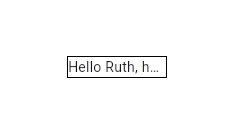
  child: Text(overflow: TextOverflow.ellipsis, 'Hello $_name, how are you?')
)
这个例子展示了设置了TextOverflow.ellipsis的情况下,如果宽度不够的时候,溢出状态应该如何展示。
例子2
Text(
  overflow: TextOverflow.fade,
  maxLines: 1,
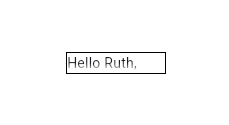
  'Hello $_name, how are you?')
设置了maxLines为1并不等同于禁用了换行,所以这里在展示不下的时候,展示出了fade渐变,但是因为最大行数只有1,所以有换行的渐变出现在了底部。
Text(
  overflow: TextOverflow.fade,
  softWrap: false,
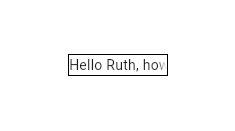
  'Hello $_name, how are you?')
而如果将换行设置为false,那么渐变将会出现在了行尾部,因为禁止了换行。
例子3
const Text.rich(
  TextSpan(
    text: 'Hello', // default text style
    children: <TextSpan>[
      TextSpan(text: ' beautiful ', style: TextStyle(fontStyle: FontStyle.italic)),
      TextSpan(text: 'world', style: TextStyle(fontWeight: FontWeight.bold)),
    ],
  ),
)
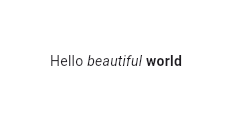
使用Text.rich构造函数,Text组件可以显示具有不同样式的TextSpan段落。这里例子展示了具有每个单词拥有不同样式。
交互
要让Text响应触摸事件,请将其包裹在GestureDetector中,并设置GestureDetector.onTap处理函数。在Material Design应用中,建议改用TextButton;如果不合适,只要也要使用InkWell(InkWell会在点击的时候有一层水波纹)而非GestureDetector。若想让文本的某部分可以交互,可以使用RichText,并在相应TextSpan的recognizer上指定TapGestureRecognizer`。
选择
Text默认情况下是不可以被选中的。想让Text可以被选中,那么可以将其包裹在有SelectionArea组件的组件树中。想要组件树中的某些组件不被选中,可以使用SelectionContainer.disabled包裹。
Widget build(BuildContext context) {
return MaterialApp(
home: Scaffold(
appBar: AppBar(title: const Text('SelectionContainer.disabled Sample')),
body: const Center(
child: SelectionArea(
child: Column(
mainAxisAlignment: MainAxisAlignment.center,
children: <Widget>[
Text('Selectable text'),
SelectionContainer.disabled(child: Text('Non-selectable text')),
Text('Selectable text'),
],
),
),
),
),
);
}
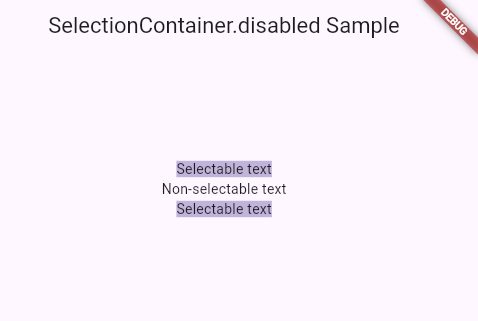
构造函数
创建一个Text组件
Text.new(
String data,
{Key? key,
TextStyle? style,
StrutStyle? strutStyle,
TextAlign? textAlign,
TextDirection? textDirection,
Locale? locale,
bool? softWrap,
TextOverflow? overflow,
('Use textScaler instead. ' 'Use of textScaleFactor was deprecated in preparation for the upcoming nonlinear text scaling support. ' 'This feature was deprecated after v3.12.0-2.0.pre.') double? textScaleFactor,
TextScaler? textScaler,
int? maxLines,
String? semanticsLabel,
String? semanticsIdentifier,
TextWidthBasis? textWidthBasis,
TextHeightBehavior? textHeightBehavior,
Color? selectionColor
})
创建一个多样式Text组件
Text.rich(
InlineSpan textSpan,
{Key? key,
TextStyle? style,
StrutStyle? strutStyle,
TextAlign? textAlign,
TextDirection? textDirection,
Locale? locale,
bool? softWrap,
TextOverflow? overflow,
('Use textScaler instead. ' 'Use of textScaleFactor was deprecated in preparation for the upcoming nonlinear text scaling support. ' 'This feature was deprecated after v3.12.0-2.0.pre.') double? textScaleFactor,
TextScaler? textScaler,
int? maxLines,
String? semanticsLabel,
String? semanticsIdentifier,
TextWidthBasis? textWidthBasis,
TextHeightBehavior? textHeightBehavior,
Color? selectionColor
})
属性
| 属性名 | 属性类型 | 说明 |
|---|---|---|
| data | String? | 展示的文本 |
| locale | Locale? | 用于相同Unicode字符可以根据区域渲染不同的内容 |
| maxLines | int? | 可选的最大行数,必要时自动换行。如果文本超过指定行数,将根据溢出方式截断 |
| overflow | TextOverflow? | 设置文本溢出时候如何处理 |
| selectionColor | Color? | 当选择文本的时候,选中文字的背景颜色 |
| softWrap | bool? | 当一行文字长度超过当前可显示区域的宽度时,自动在当前行选择一个合适的位置换行 |
| strutStyle | StrutStyle? | 为整段文字设置统一、可预测的高度基线和行高,不受实际字形(如中文、英文、emoji、上下标)的影响 |
| style | TextStyle? | 如果设置了,将使用这个style给Text设置样式 |
| textAlign | TextAlign? | 设置文本在横向上的排列方式 |
| textDirection | TextDirection? | 设置文本排列方向,从左往右或者从右往左 |
| textHeightBehavior | TextHeightBehavior? | 微调行高计算规则,设置第一行或者最后一行的行高要不要参与整体高度计算 |
| textScaler | TextScaler? | 设置字体缩放 |
| textSpan | InlineSpan | 设置Text内部的内联文本 |
| textWidthBasis | TextWidthBasis? | 用于告诉渲染引擎文本宽度是按照文本最长的一行,还是父布局给的约束宽度 |