IntrinsicWidth
一个将其子项大小调整为其子项固有宽度的组件
IntrinsicWidth的功能是把子组件的宽度压缩成其内容的固有宽度,而不是让它横向撑满父容器。
具体行为:
- 默认情况下,
Row、Column、Flex等组件会尽可能扩展以填充满主轴上的可用空间 - 套上
IntrinsicWidth之后,它们会收缩到内容本身的最小宽度即固有宽度 - 同时它还会把子组件的高度限制在父容器的高度内(除非自己放开约束)
这个组件的消耗非常巨大,尽可能不要使用它
示例
示例1
Column(
  children: [
    // 场景 1:Row 会被拉伸到整行
    Container(
      color: Colors.amber[100],
      child: Row(
        children: [
          ElevatedButton(onPressed: () {}, child: const Text('Short')),
          ElevatedButton(onPressed: () {}, child: const Text('A very long label')),
        ],
      ),
    ),
    const SizedBox(height: 16),
    // 场景 2:用 IntrinsicWidth 压缩
    Container(
      color: Colors.amber[100],
      child: IntrinsicWidth(
        child: Row(
          children: [
            ElevatedButton(onPressed: () {}, child: const Text('Short')),
            ElevatedButton(onPressed: () {}, child: const Text('A very long label')),
          ],
        ),
      ),
    ),
  ],
)
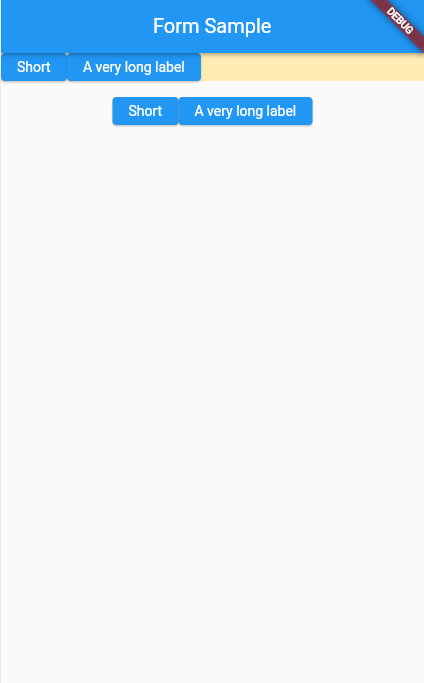
可以看到在场景1中,没有添加IntrinsicWidth的时候,Row占满整行。而场景2中添加了IntrinsicWidth之后,Row只会占满自己的本身的固有宽度。
示例2
IntrinsicWidth(
  child: Column(
    crossAxisAlignment: CrossAxisAlignment.stretch,
    children: [
      ElevatedButton(onPressed: () {}, child: Text('OK')),
      ElevatedButton(onPressed: () {}, child: Text('Cancel')),
    ],
  ),
)
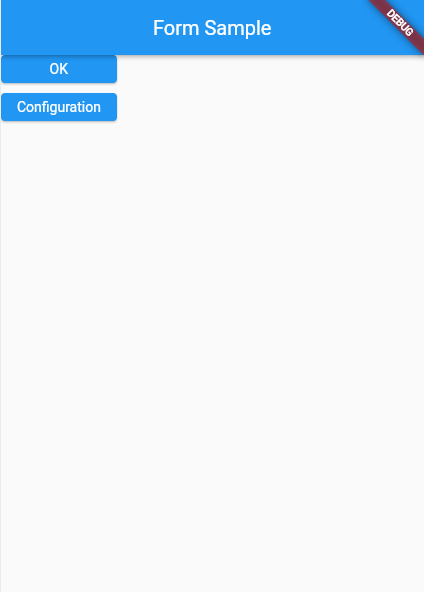
这个例子中,让Column中本来宽度占满全屏的按钮,按照其中宽度最大的那个按钮来设置宽度。
构造函数
IntrinsicWidth.new({
  Key? key,
  double? stepWidth,
  double? stepHeight,
  Widget? child
})
属性
| 属性名 | 属性类型 | 说明 |
|---|---|---|
| child | Widget? | 子组件 |
| stepWidth | double? | 设置收缩后的宽度必须是 stepWidth的倍数 |
| stepHeight | double? | 设置收缩后的高度必须是 stepHeight的倍数 |