CustomMultiChildLayout
一个用`Delegate`来调整和定位多个子组件的容器组件
delegate对象可以为每个子组件确定布局约束,并决定每个子组件的摆放位置。也可以用于确定父组件的尺寸,但是父组件的尺寸不能依赖于子组件的尺寸。
CustomMultiChildLayout适用于多个组件的尺寸和位置之间存在复杂关系的情况。如果仅仅需要控制一个子组件的布局,那么使用CustomSingleChildLayout更加适合。对于简单场景,比如将某个组件对齐到某一边缘,Stack组件更加合适。
每个组件都必须包裹在LayoutId组件中,以便delegate对象能够识别该组件。
注意点:
LayoutId每个子组件都必须使用LayoutId组件包裹,并指定唯一的IdperformLayout在delegate对象中用于对子组件进行布局的方法hasChild(id)用于判断某个子组件是否存在constraints使用BoxConstraints来限制子组件的最大/最小宽高shouldRelayout决定是否要对子组件进行重新布局
performLayout的具体使用:
必须调用layoutChild和positionChild这两个方法来测量和布局子组件
layoutChild(id, constraints)告诉Flutter按给定的约束条件去计算指定id的子组件的实际尺寸(宽、高),返回子组件最终占用的Size。可以用这个值来决定如何摆放它,或计算其他子组件的位置。每个子组件只能调用一次,否则会抛出FlutterError。必须用hasChild(id)检查是否存在该子组件,防止崩溃。positionChild(id, offset)把已经测量过的子组件放置到父容器坐标系中的某个偏移位置上。必须在调用过layoutChild之后才能调用positionChild,否则会抛出FlutterError。
示例
import 'package:flutter/material.dart';
/// Flutter code sample for [CustomMultiChildLayout].
void main() => runApp(const CustomMultiChildLayoutApp());
class CustomMultiChildLayoutApp extends StatelessWidget {
const CustomMultiChildLayoutApp({super.key});
Widget build(BuildContext context) {
return const MaterialApp(
home: Directionality(
// TRY THIS: Try changing the direction here and hot-reloading to
// see the layout change.
textDirection: TextDirection.ltr,
child: Scaffold(body: CustomMultiChildLayoutExample()),
),
);
}
}
/// Lays out the children in a cascade, where the top corner of the next child
/// is a little above (`overlap`) the lower end corner of the previous child.
///
/// Will relayout if the text direction changes.
class _CascadeLayoutDelegate extends MultiChildLayoutDelegate {
_CascadeLayoutDelegate({
required this.colors,
required this.overlap,
required this.textDirection,
});
final Map<String, Color> colors;
final double overlap;
final TextDirection textDirection;
// Perform layout will be called when re-layout is needed.
void performLayout(Size size) {
final double columnWidth = size.width / colors.length;
Offset childPosition = Offset.zero;
switch (textDirection) {
case TextDirection.rtl:
childPosition += Offset(size.width, 0);
case TextDirection.ltr:
break;
}
for (final String color in colors.keys) {
// layoutChild must be called exactly once for each child.
final Size currentSize = layoutChild(
color,
BoxConstraints(maxHeight: size.height, maxWidth: columnWidth),
);
// positionChild must be called to change the position of a child from
// what it was in the previous layout. Each child starts at (0, 0) for the
// first layout.
switch (textDirection) {
case TextDirection.rtl:
positionChild(color, childPosition - Offset(currentSize.width, 0));
childPosition += Offset(-currentSize.width, currentSize.height - overlap);
case TextDirection.ltr:
positionChild(color, childPosition);
childPosition += Offset(currentSize.width, currentSize.height - overlap);
}
}
}
// shouldRelayout is called to see if the delegate has changed and requires a
// layout to occur. Should only return true if the delegate state itself
// changes: changes in the CustomMultiChildLayout attributes will
// automatically cause a relayout, like any other widget.
bool shouldRelayout(_CascadeLayoutDelegate oldDelegate) {
return oldDelegate.textDirection != textDirection || oldDelegate.overlap != overlap;
}
}
class CustomMultiChildLayoutExample extends StatelessWidget {
const CustomMultiChildLayoutExample({super.key});
static const Map<String, Color> _colors = <String, Color>{
'Red': Colors.red,
'Green': Colors.green,
'Blue': Colors.blue,
'Cyan': Colors.cyan,
};
Widget build(BuildContext context) {
return CustomMultiChildLayout(
delegate: _CascadeLayoutDelegate(
colors: _colors,
overlap: 30.0,
textDirection: Directionality.of(context),
),
children: <Widget>[
// Create all of the colored boxes in the colors map.
for (final MapEntry<String, Color> entry in _colors.entries)
// The "id" can be any Object, not just a String.
LayoutId(
id: entry.key,
child: Container(
color: entry.value,
width: 100.0,
height: 100.0,
alignment: Alignment.center,
child: Text(entry.key),
),
),
],
);
}
}
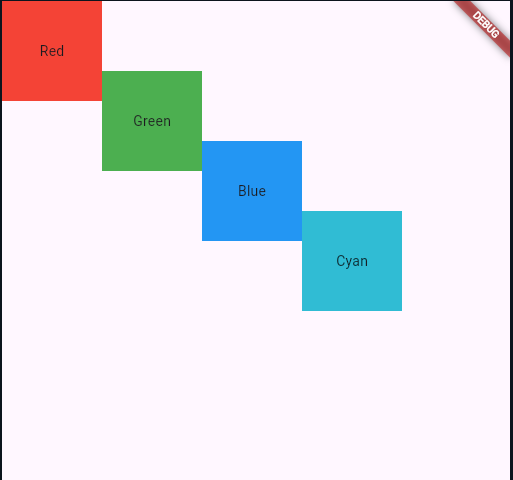
构造函数
CustomMultiChildLayout.new({
  Key? key,
  required MultiChildLayoutDelegate delegate,
  List<Widget> children = const <Widget>[]
})
属性
| 属性名 | 属性类型 | 说明 |
|---|---|---|
| children | List<Widget> | 子组件 |
| delegate | MultiChildLayoutDelegate | 子组件布局委托对象 |