Autocomplete
一个可以进行选择的组件,并且在输入一些文本的时候可以快速筛选
用户的文本输入通过fieldViewBuilder字段接收,要显示的选项由optionsBuilder决定,并通过optionsViewBuilder渲染。
示例
例子1
import 'package:flutter/material.dart';
/// Flutter code sample for [Autocomplete].
void main() => runApp(const AutocompleteExampleApp());
class AutocompleteExampleApp extends StatelessWidget {
const AutocompleteExampleApp({super.key});
Widget build(BuildContext context) {
return MaterialApp(
home: Scaffold(
appBar: AppBar(title: const Text('Autocomplete Basic')),
body: Center(
child: Column(
mainAxisAlignment: MainAxisAlignment.center,
children: <Widget>[
Text(
'Type below to autocomplete the following possible results: ${AutocompleteBasicExample._kOptions}.',
),
const AutocompleteBasicExample(),
],
),
),
),
);
}
}
class AutocompleteBasicExample extends StatelessWidget {
const AutocompleteBasicExample({super.key});
static const List<String> _kOptions = <String>['aardvark', 'bobcat', 'chameleon'];
Widget build(BuildContext context) {
return Autocomplete<String>(
optionsBuilder: (TextEditingValue textEditingValue) {
if (textEditingValue.text == '') {
return const Iterable<String>.empty();
}
return _kOptions.where((String option) {
return option.contains(textEditingValue.text.toLowerCase());
});
},
onSelected: (String selection) {
debugPrint('You just selected $selection');
},
);
}
}
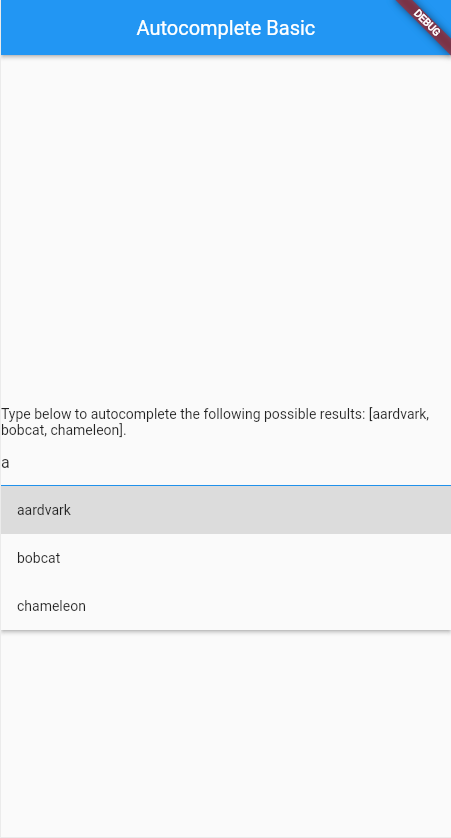
这个例子展示了如何使用默认UI创建了一个基础的Autocomplete组件。
例子2
import 'package:flutter/material.dart';
/// Flutter code sample for [Autocomplete].
void main() => runApp(const AutocompleteExampleApp());
class AutocompleteExampleApp extends StatelessWidget {
const AutocompleteExampleApp({super.key});
Widget build(BuildContext context) {
return MaterialApp(
home: Scaffold(
appBar: AppBar(title: const Text('Autocomplete Basic User')),
body: Center(
child: Column(
mainAxisAlignment: MainAxisAlignment.center,
children: <Widget>[
Text(
'Type below to autocomplete the following possible results: ${AutocompleteBasicUserExample._userOptions}.',
),
const AutocompleteBasicUserExample(),
],
),
),
),
);
}
}
class User {
const User({required this.email, required this.name});
final String email;
final String name;
String toString() {
return '$name, $email';
}
bool operator ==(Object other) {
if (other.runtimeType != runtimeType) {
return false;
}
return other is User && other.name == name && other.email == email;
}
int get hashCode => Object.hash(email, name);
}
class AutocompleteBasicUserExample extends StatelessWidget {
const AutocompleteBasicUserExample({super.key});
static const List<User> _userOptions = <User>[
User(name: 'Alice', email: 'alice@example.com'),
User(name: 'Bob', email: 'bob@example.com'),
User(name: 'Charlie', email: 'charlie123@gmail.com'),
];
static String _displayStringForOption(User option) => option.name;
Widget build(BuildContext context) {
return Autocomplete<User>(
displayStringForOption: _displayStringForOption,
optionsBuilder: (TextEditingValue textEditingValue) {
if (textEditingValue.text == '') {
return const Iterable<User>.empty();
}
return _userOptions.where((User option) {
return option.toString().contains(textEditingValue.text.toLowerCase());
});
},
onSelected: (User selection) {
debugPrint('You just selected ${_displayStringForOption(selection)}');
},
);
}
}
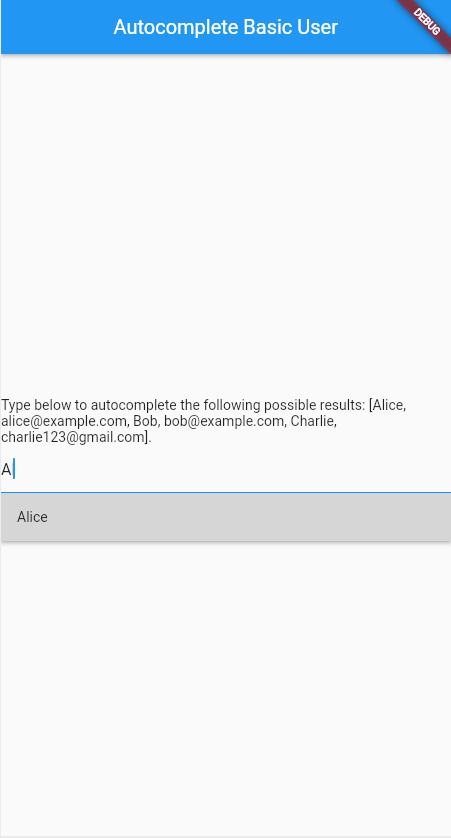
这个例子展示了如何创建一个自定义类型的Autocomplete,可以筛选搜索name或email字段。
例子3
import 'package:flutter/material.dart';
/// Flutter code sample for [Autocomplete] that shows how to fetch the options
/// from a remote API.
const Duration fakeAPIDuration = Duration(seconds: 1);
void main() => runApp(const AutocompleteExampleApp());
class AutocompleteExampleApp extends StatelessWidget {
const AutocompleteExampleApp({super.key});
Widget build(BuildContext context) {
return MaterialApp(
home: Scaffold(
appBar: AppBar(title: const Text('Autocomplete - async')),
body: Center(
child: Column(
mainAxisAlignment: MainAxisAlignment.center,
children: <Widget>[
Text(
'Type below to autocomplete the following possible results: ${_FakeAPI._kOptions}.',
),
const _AsyncAutocomplete(),
],
),
),
),
);
}
}
class _AsyncAutocomplete extends StatefulWidget {
const _AsyncAutocomplete();
State<_AsyncAutocomplete> createState() => _AsyncAutocompleteState();
}
class _AsyncAutocompleteState extends State<_AsyncAutocomplete> {
// The query currently being searched for. If null, there is no pending
// request.
String? _searchingWithQuery;
// The most recent options received from the API.
late Iterable<String> _lastOptions = <String>[];
Widget build(BuildContext context) {
return Autocomplete<String>(
optionsBuilder: (TextEditingValue textEditingValue) async {
_searchingWithQuery = textEditingValue.text;
final Iterable<String> options = await _FakeAPI.search(_searchingWithQuery!);
// If another search happened after this one, throw away these options.
// Use the previous options instead and wait for the newer request to
// finish.
if (_searchingWithQuery != textEditingValue.text) {
return _lastOptions;
}
_lastOptions = options;
return options;
},
onSelected: (String selection) {
debugPrint('You just selected $selection');
},
);
}
}
// Mimics a remote API.
class _FakeAPI {
static const List<String> _kOptions = <String>['aardvark', 'bobcat', 'chameleon'];
// Searches the options, but injects a fake "network" delay.
static Future<Iterable<String>> search(String query) async {
await Future<void>.delayed(fakeAPIDuration); // Fake 1 second delay.
if (query == '') {
return const Iterable<String>.empty();
}
return _kOptions.where((String option) {
return option.contains(query.toLowerCase());
});
}
}
这个例子展示了Autocomplete如何通过网络请求来获取筛选项。
例子4
import 'dart:async';
import 'package:flutter/material.dart';
/// Flutter code sample for [Autocomplete] that demonstrates fetching the
/// options asynchronously and debouncing the network calls.
const Duration fakeAPIDuration = Duration(seconds: 1);
const Duration debounceDuration = Duration(milliseconds: 500);
void main() => runApp(const AutocompleteExampleApp());
class AutocompleteExampleApp extends StatelessWidget {
const AutocompleteExampleApp({super.key});
Widget build(BuildContext context) {
return MaterialApp(
home: Scaffold(
appBar: AppBar(title: const Text('Autocomplete - async and debouncing')),
body: Center(
child: Column(
mainAxisAlignment: MainAxisAlignment.center,
children: <Widget>[
Text(
'Type below to autocomplete the following possible results: ${_FakeAPI._kOptions}.',
),
const _AsyncAutocomplete(),
],
),
),
),
);
}
}
class _AsyncAutocomplete extends StatefulWidget {
const _AsyncAutocomplete();
State<_AsyncAutocomplete> createState() => _AsyncAutocompleteState();
}
class _AsyncAutocompleteState extends State<_AsyncAutocomplete> {
// The query currently being searched for. If null, there is no pending
// request.
String? _currentQuery;
// The most recent options received from the API.
late Iterable<String> _lastOptions = <String>[];
late final _Debounceable<Iterable<String>?, String> _debouncedSearch;
// Calls the "remote" API to search with the given query. Returns null when
// the call has been made obsolete.
Future<Iterable<String>?> _search(String query) async {
_currentQuery = query;
// In a real application, there should be some error handling here.
final Iterable<String> options = await _FakeAPI.search(_currentQuery!);
// If another search happened after this one, throw away these options.
if (_currentQuery != query) {
return null;
}
_currentQuery = null;
return options;
}
void initState() {
super.initState();
_debouncedSearch = _debounce<Iterable<String>?, String>(_search);
}
Widget build(BuildContext context) {
return Autocomplete<String>(
optionsBuilder: (TextEditingValue textEditingValue) async {
final Iterable<String>? options = await _debouncedSearch(textEditingValue.text);
if (options == null) {
return _lastOptions;
}
_lastOptions = options;
return options;
},
onSelected: (String selection) {
debugPrint('You just selected $selection');
},
);
}
}
// Mimics a remote API.
class _FakeAPI {
static const List<String> _kOptions = <String>['aardvark', 'bobcat', 'chameleon'];
// Searches the options, but injects a fake "network" delay.
static Future<Iterable<String>> search(String query) async {
await Future<void>.delayed(fakeAPIDuration); // Fake 1 second delay.
if (query == '') {
return const Iterable<String>.empty();
}
return _kOptions.where((String option) {
return option.contains(query.toLowerCase());
});
}
}
typedef _Debounceable<S, T> = Future<S?> Function(T parameter);
/// Returns a new function that is a debounced version of the given function.
///
/// This means that the original function will be called only after no calls
/// have been made for the given Duration.
_Debounceable<S, T> _debounce<S, T>(_Debounceable<S?, T> function) {
_DebounceTimer? debounceTimer;
return (T parameter) async {
if (debounceTimer != null && !debounceTimer!.isCompleted) {
debounceTimer!.cancel();
}
debounceTimer = _DebounceTimer();
try {
await debounceTimer!.future;
} on _CancelException {
return null;
}
return function(parameter);
};
}
// A wrapper around Timer used for debouncing.
class _DebounceTimer {
_DebounceTimer() {
_timer = Timer(debounceDuration, _onComplete);
}
late final Timer _timer;
final Completer<void> _completer = Completer<void>();
void _onComplete() {
_completer.complete();
}
Future<void> get future => _completer.future;
bool get isCompleted => _completer.isCompleted;
void cancel() {
_timer.cancel();
_completer.completeError(const _CancelException());
}
}
// An exception indicating that the timer was canceled.
class _CancelException implements Exception {
const _CancelException();
}
这个例子展示了Autocomplete在使用网络请求获取筛选结果的时候,利用debounce来让用户在输入内容结束间隔若干时间后再发起网络请求,防止过度请求。
例子5
import 'dart:async';
import 'package:flutter/material.dart';
/// Flutter code sample for [Autocomplete] that demonstrates fetching the
/// options asynchronously and debouncing the network calls, including handling
/// network errors.
void main() => runApp(const AutocompleteExampleApp());
const Duration fakeAPIDuration = Duration(seconds: 1);
const Duration debounceDuration = Duration(milliseconds: 500);
class AutocompleteExampleApp extends StatelessWidget {
const AutocompleteExampleApp({super.key});
Widget build(BuildContext context) {
return MaterialApp(
home: Scaffold(
appBar: AppBar(title: const Text('Autocomplete - async, debouncing, and network errors')),
body: Center(
child: Column(
mainAxisAlignment: MainAxisAlignment.center,
children: <Widget>[
Text(
'Type below to autocomplete the following possible results: ${_FakeAPI._kOptions}.',
),
const SizedBox(height: 32.0),
const _AsyncAutocomplete(),
],
),
),
),
);
}
}
class _AsyncAutocomplete extends StatefulWidget {
const _AsyncAutocomplete();
State<_AsyncAutocomplete> createState() => _AsyncAutocompleteState();
}
class _AsyncAutocompleteState extends State<_AsyncAutocomplete> {
// The query currently being searched for. If null, there is no pending
// request.
String? _currentQuery;
// The most recent options received from the API.
late Iterable<String> _lastOptions = <String>[];
late final _Debounceable<Iterable<String>?, String> _debouncedSearch;
// Whether to consider the fake network to be offline.
bool _networkEnabled = true;
// A network error was received on the most recent query.
bool _networkError = false;
// Calls the "remote" API to search with the given query. Returns null when
// the call has been made obsolete.
Future<Iterable<String>?> _search(String query) async {
_currentQuery = query;
late final Iterable<String> options;
try {
options = await _FakeAPI.search(_currentQuery!, _networkEnabled);
} on _NetworkException {
if (mounted) {
setState(() {
_networkError = true;
});
}
return <String>[];
}
// If another search happened after this one, throw away these options.
if (_currentQuery != query) {
return null;
}
_currentQuery = null;
return options;
}
void initState() {
super.initState();
_debouncedSearch = _debounce<Iterable<String>?, String>(_search);
}
Widget build(BuildContext context) {
return Column(
mainAxisAlignment: MainAxisAlignment.center,
children: <Widget>[
Text(
_networkEnabled
? 'Network is on, toggle to induce network errors.'
: 'Network is off, toggle to allow requests to go through.',
),
Switch(
value: _networkEnabled,
onChanged: (bool? value) {
setState(() {
_networkEnabled = !_networkEnabled;
});
},
),
const SizedBox(height: 32.0),
Autocomplete<String>(
fieldViewBuilder:
(
BuildContext context,
TextEditingController controller,
FocusNode focusNode,
VoidCallback onFieldSubmitted,
) {
return TextFormField(
decoration: InputDecoration(
errorText: _networkError ? 'Network error, please try again.' : null,
),
controller: controller,
focusNode: focusNode,
onFieldSubmitted: (String value) {
onFieldSubmitted();
},
);
},
optionsBuilder: (TextEditingValue textEditingValue) async {
setState(() {
_networkError = false;
});
final Iterable<String>? options = await _debouncedSearch(textEditingValue.text);
if (options == null) {
return _lastOptions;
}
_lastOptions = options;
return options;
},
onSelected: (String selection) {
debugPrint('You just selected $selection');
},
),
],
);
}
}
// Mimics a remote API.
class _FakeAPI {
static const List<String> _kOptions = <String>['aardvark', 'bobcat', 'chameleon'];
// Searches the options, but injects a fake "network" delay.
static Future<Iterable<String>> search(String query, bool networkEnabled) async {
await Future<void>.delayed(fakeAPIDuration); // Fake 1 second delay.
if (!networkEnabled) {
throw const _NetworkException();
}
if (query == '') {
return const Iterable<String>.empty();
}
return _kOptions.where((String option) {
return option.contains(query.toLowerCase());
});
}
}
typedef _Debounceable<S, T> = Future<S?> Function(T parameter);
/// Returns a new function that is a debounced version of the given function.
///
/// This means that the original function will be called only after no calls
/// have been made for the given Duration.
_Debounceable<S, T> _debounce<S, T>(_Debounceable<S?, T> function) {
_DebounceTimer? debounceTimer;
return (T parameter) async {
if (debounceTimer != null && !debounceTimer!.isCompleted) {
debounceTimer!.cancel();
}
debounceTimer = _DebounceTimer();
try {
await debounceTimer!.future;
} on _CancelException {
return null;
}
return function(parameter);
};
}
// A wrapper around Timer used for debouncing.
class _DebounceTimer {
_DebounceTimer() {
_timer = Timer(debounceDuration, _onComplete);
}
late final Timer _timer;
final Completer<void> _completer = Completer<void>();
void _onComplete() {
_completer.complete();
}
Future<void> get future => _completer.future;
bool get isCompleted => _completer.isCompleted;
void cancel() {
_timer.cancel();
_completer.completeError(const _CancelException());
}
}
// An exception indicating that the timer was canceled.
class _CancelException implements Exception {
const _CancelException();
}
// An exception indicating that a network request has failed.
class _NetworkException implements Exception {
const _NetworkException();
}
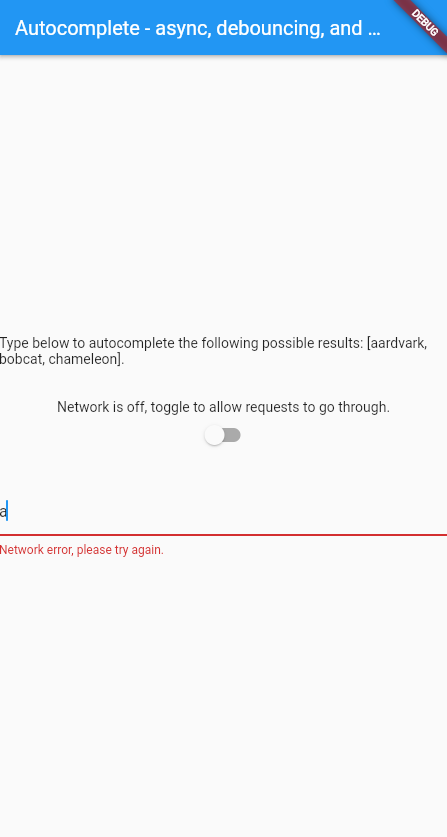
这个例子展示了如何创建一个通过网络来获取筛选项的Autocomplete组件,它包括防抖和错误处理功能,以便在用户界面展示错误信息,并且能够从中恢复。通过切换按钮来模拟网络离线。
构造函数
Autocomplete.new({
  Key? key,
  required AutocompleteOptionsBuilder<T> optionsBuilder,
  AutocompleteOptionToString<T> displayStringForOption = RawAutocomplete.defaultStringForOption,
  AutocompleteFieldViewBuilder fieldViewBuilder = _defaultFieldViewBuilder,
  FocusNode? focusNode, AutocompleteOnSelected<T>? onSelected,
  double optionsMaxHeight = 200.0,
  AutocompleteOptionsViewBuilder<T>? optionsViewBuilder,
  OptionsViewOpenDirection optionsViewOpenDirection = OptionsViewOpenDirection.down,
  TextEditingController? textEditingController,
  TextEditingValue? initialValue
})
属性
| 属性名 | 属性类型 | 说明 |
|---|---|---|
| displayStringForOption | AutocompleteOptionToString<T> | 用于设置当选择某个选项后,在输入框中展示的字符串 |
| fieldViewBuilder | AutocompleteFieldViewBuilder | 用于设置输入框应该怎么被构建和显示,自定义输入框的外观和行为 |
| initialValue | TextEditingValue? | 输入框的初始值 |
| onSelected | AutocompleteOnSelected<T>? | 当选择了某个选项后,会调用该回调 |
| optionsBuilder | AutocompleteOptionsBuilder<T> | 根据当前输入的文本,返回需要展示的候选列表 |
| optionsMaxHeight | double | 设置选项面板的最大高度,当超过高度后会自动变成可滚动的 |
| optionsViewBuilder | AutocompleteOptionsViewBuilder<T>? | 构建选择项的样式界面 |
| optionsViewOpenDirection | OptionsViewOpenDirection | 描述Autocomplete的下拉列表应该从哪个方向展开 |
| textEditingController | TextEditingController? | 给Autocomplete使用的Controller |
额外说明
- optionsViewOpenDirection:
down在输入框下方展开,up在输入框上方展开,downThenUp先尝试下方,下方空间不足时再改向上,upThenDown先尝试上方,上方空间不足时再改向下