Flow
一个根据`FlowDelegate`实现,对子组件高效地进行尺寸和位置排列的组件
在Flutter中,Flow组件是一个高级且灵活的布局组件,用于实现自定义的流式布局。它允许开发者通过自定义的FlowDelegate来控制子组件的排列方式,适用于需要动态、复杂布局的场景,比如瀑布流、环形布局或者自定义动画效果。Flow仅重绘和重新布局受影响的子组件,性能较优。可以配合动画实现子组件的动态移动效果。
示例
示例1 使用FlowDelegate
class CustomFlowDelegate extends FlowDelegate {
CustomFlowDelegate({this.margin = EdgeInsets.zero});
final EdgeInsets margin;
Size getSize(BoxConstraints constraints) {
// 定义 Flow 组件的整体大小
return Size(constraints.maxWidth, constraints.maxHeight);
}
void paintChildren(FlowPaintingContext context) {
// 绘制子组件
double x = margin.left;
double y = margin.top;
for (int i = 0; i < context.childCount; i++) {
// 获取子组件的大小
Size childSize = context.getChildSize(i)!;
// 设置子组件的位置(沿对角线排列)
context.paintChild(
//根据索引自动获取对应的子组件进行绘制
i,
//translationValues中传入对应的x轴 y轴 z轴圆点
transform: Matrix4.translationValues(x, y, 0),
);
x += childSize.width + 10; // 横向间距
y += childSize.height + 10; // 纵向间距
}
}
bool shouldRepaint(covariant CustomFlowDelegate oldDelegate) {
// 判断是否需要重绘
return margin != oldDelegate.margin;
}
}
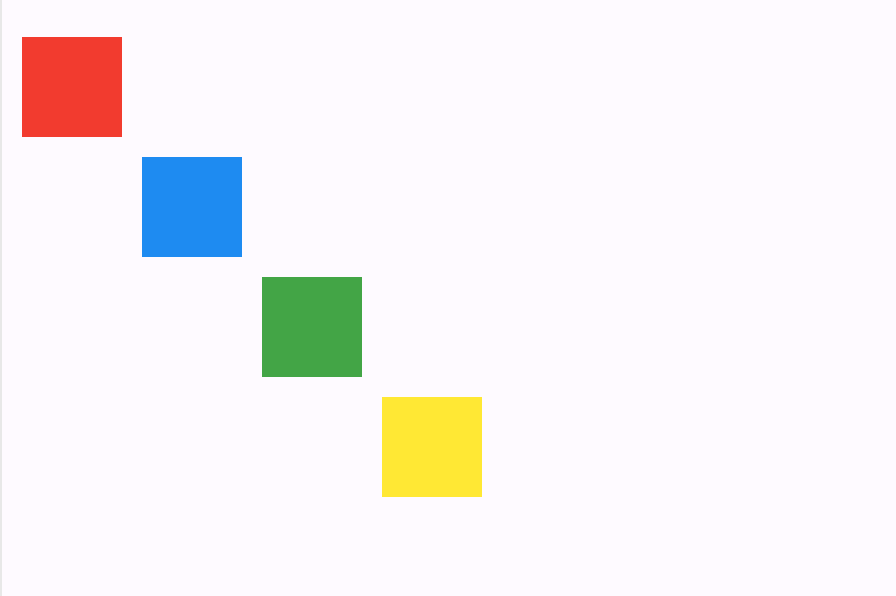
FlowDelegate中的重要方法:
paintChildren定义子组件的绘制位置getSize定义整个Flow组件的大小shouldRepaint决定是否要进行重绘getConstraintsForChild为每个子组件提供约束
示例2 结合Animation 实现子组件动态移动效果
class FlowMenu extends StatefulWidget {
const FlowMenu({super.key});
State<FlowMenu> createState() => _FlowMenuState();
}
class _FlowMenuState extends State<FlowMenu> with SingleTickerProviderStateMixin {
late AnimationController menuAnimation;
IconData lastTapped = Icons.notifications;
final List<IconData> menuItems = <IconData>[
Icons.home,
Icons.new_releases,
Icons.notifications,
Icons.settings,
Icons.menu,
];
void _updateMenu(IconData icon) {
if (icon != Icons.menu) {
setState(() => lastTapped = icon);
}
}
void initState() {
super.initState();
menuAnimation = AnimationController(duration: const Duration(milliseconds: 250), vsync: this);
}
Widget flowMenuItem(IconData icon) {
final double buttonDiameter = MediaQuery.of(context).size.width / menuItems.length;
return Padding(
padding: const EdgeInsets.symmetric(vertical: 8.0),
child: RawMaterialButton(
fillColor: lastTapped == icon ? Colors.amber[700] : Colors.blue,
splashColor: Colors.amber[100],
shape: const CircleBorder(),
constraints: BoxConstraints.tight(Size(buttonDiameter, buttonDiameter)),
onPressed: () {
_updateMenu(icon);
//根据AnimationController当前的状态,来决定是正向播放动画还是反向播放动画
menuAnimation.status == AnimationStatus.completed
? menuAnimation.reverse()
: menuAnimation.forward();
},
child: Icon(icon, color: Colors.white, size: 45.0),
),
);
}
Widget build(BuildContext context) {
return Flow(
delegate: FlowMenuDelegate(menuAnimation: menuAnimation),
children: menuItems.map<Widget>((IconData icon) => flowMenuItem(icon)).toList(),
);
}
}
class FlowMenuDelegate extends FlowDelegate {
FlowMenuDelegate({required this.menuAnimation}) : super(repaint: menuAnimation);
final Animation<double> menuAnimation;
bool shouldRepaint(FlowMenuDelegate oldDelegate) {
return menuAnimation != oldDelegate.menuAnimation;
}
void paintChildren(FlowPaintingContext context) {
double dx = 0.0;
for (int i = 0; i < context.childCount; ++i) {
dx = context.getChildSize(i)!.width * i;
context.paintChild(i, transform: Matrix4.translationValues(dx * menuAnimation.value, 0, 0));
}
}
}
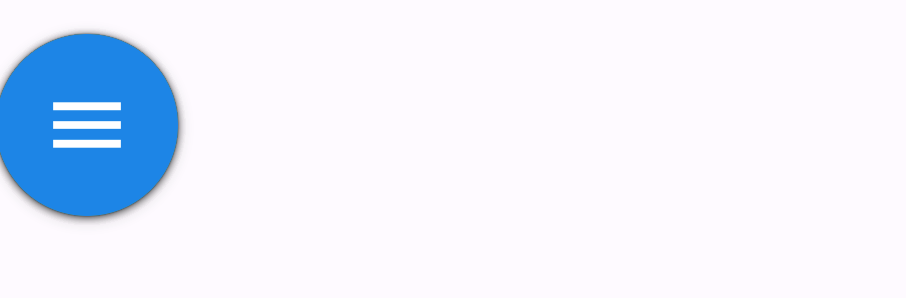
动画未开始,menuAnimation.value的值为0,所有的子组件都在原点处绘制
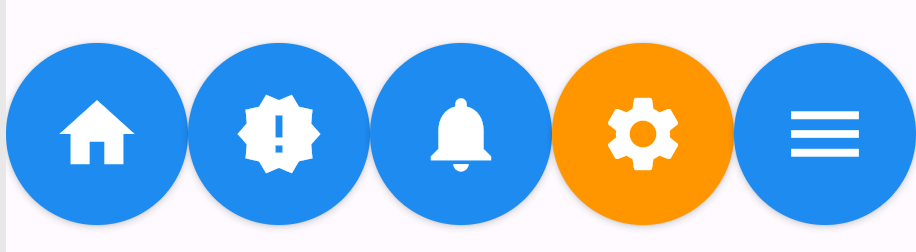
动画执行完毕,menuAnimation.value的值为1,子组件在对应位置 * width的地方进行绘制
构造函数
Flow.new({
  Key? key,
  required FlowDelegate delegate,
  List<Widget> children = const <Widget>[],
  Clip clipBehavior = Clip.hardEdge
})


Flow.unwrapped({
  Key? key,
  required FlowDelegate delegate,
  List<Widget> children = const <Widget>[],
  Clip clipBehavior = Clip.hardEdge
})
- 正常通过
new构造函数创造的Flow组件,它的每一个子组件都会被包裹在RepaintBoundary中,用于在子组件重绘的时候判断是否需要整体重绘Flow组件。 - 通过
unwrapped构造函数创建的Flow组件,子组件不会被包裹在RepaintBoundary中,适用于子组件数量较少,且不希望RepaintBoundary消耗性能。
属性
| 属性名 | 属性类型 | 说明 |
|---|---|---|
| children | List<Widget> | 子组件 |
| clipBehavior | Clip | 根据设置决定是否裁剪内容 |
| delegate | FlowDelegate | 组件的布局委托对象 |