Expanded
一个可以扩展Row、Column或者Flex子组件的组件,以便子组件填充可用空间
使用Expanded组件可以让Row、Column或Flex的子组件沿着主轴扩展以填满可用空间。如果有多个子组件被扩展,可用空间将根据flex因子在它们之间分配。
Expanded组件必须是Row、Column或Flex的后代,并且从Expanded组件到其包含的Row、Column或Flex的路径中只能包含StatelessWidgets或StatefulWidgets不能是其他类型的组件。
示例
示例1
Center(
  child: Column(
    children: <Widget>[
      Container(color: Colors.blue, height: 100, width: 100),
      Expanded(child: Container(color: Colors.amber, width: 100)),
      Container(color: Colors.blue, height: 100, width: 100),
    ],
  ),
)
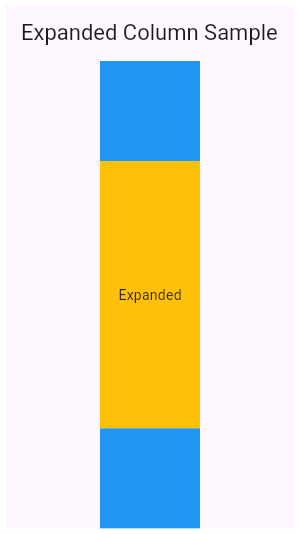
这个例子显示了如何在Column中使用一个Expanded组件放在中间扩展高度来撑满剩余空间。
示例2
Center(
  child: Row(
    children: <Widget>[
      Expanded(flex: 2, child: Container(color: Colors.amber, height: 100)),
      Container(color: Colors.blue, height: 100, width: 50),
      Expanded(child: Container(color: Colors.amber, height: 100)),
    ],
  ),
)
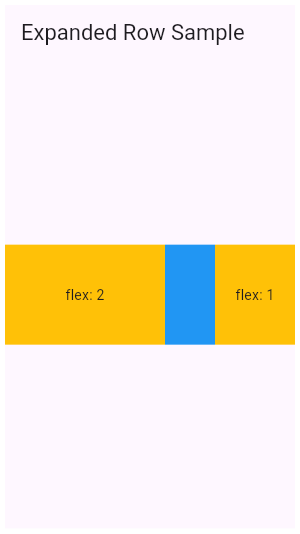
这个例子展示了在Row中有多个Expanded组件时,根据flex系数来决定填充剩余空间的比例。
构造函数
Expanded.new({
  Key? key,
  int flex = 1,
  required Widget child
})
参数
| 参数名 | 参数类型 | 说明 |
|---|---|---|
| child | Widget | 子组件 |
| fit | FlexFit | 控制子组件在主轴上如何填充剩余空间 |
| flex | int | 多个Expanded组件对于剩余空间的分配比例 |
额外说明
fit
FlexFit.tight默认值,子组件会被强制拉伸,完全填满分配给Expanded的剩余空间,即使子组件本身有更小或更大的约束。FlexFit.loose,允许子组件的保持自身的约束不被拉伸,如剩余空间宽度有200,子组件设置的宽度为50(Container(width: 50)),它不会强制拉伸,而是保持原尺寸。