OverflowBox
一个对自身子组件施加与其父组件所给约束不同的约束的组件,可能允许子组件超出父组件边界
示例
import 'package:flutter/material.dart';
/// Flutter code sample for [OverflowBox].
void main() => runApp(const OverflowBoxApp());
class OverflowBoxApp extends StatelessWidget {
const OverflowBoxApp({super.key});
Widget build(BuildContext context) {
return MaterialApp(
home: Scaffold(
appBar: AppBar(title: const Text('OverflowBox Sample')),
body: const Center(child: OverflowBoxExample()),
),
);
}
}
class OverflowBoxExample extends StatelessWidget {
const OverflowBoxExample({super.key});
Widget build(BuildContext context) {
return Column(
mainAxisAlignment: MainAxisAlignment.center,
children: <Widget>[
const Text('Cover Me'),
// This parent container has fixed width and
// height of 100 pixels.
Container(
width: 100,
height: 100,
color: Theme.of(context).colorScheme.secondaryContainer,
// This OverflowBox imposes its own constraints of maxWidth
// and maxHeight of 200 pixels on its child which allows the
// child to overflow the parent container.
child: const OverflowBox(
maxWidth: 200,
maxHeight: 200,
// Without the OverflowBox, the child widget would be
// constrained to the size of the parent container
// and would not overflow the parent container.
child: FlutterLogo(size: 200),
),
),
],
);
}
}
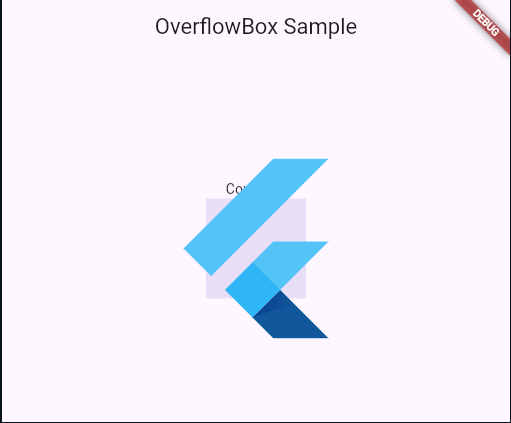
构造函数
OverflowBox.new({
  Key? key,
  AlignmentGeometry alignment = Alignment.center,
  double? minWidth,
  double? maxWidth,
  double? minHeight,
  double? maxHeight,
  OverflowBoxFit fit = OverflowBoxFit.max,
  Widget? child
})
属性
| 属性名 | 属性类型 | 说明 |
|---|---|---|
| alignment | AlignmentGeometry | 对齐方式 |
| child | Widget? | 子组件 |
| fit | OverflowBoxFit | 大小适配方式 |
| maxWidth | double | 最大宽度 |
| minWidth | double | 最小宽度 |
| maxHeight | double | 最大高度 |
| minHeight | double | 最小高度 |
补充OverflowBoxFit的使用(这个参数仅在子组件没有发生溢出情况下生效):
- max
OverflowBox会尽量扩展到父级允许的最大尺寸。这是默认行为,适合大多数场景,让OverflowBox尽可能大以容纳潜在的溢出内容。 - deferToChild
OverflowBox会根据子组件的大小来调整自身尺寸,使其匹配子组件的大小(在父级约束范围内)。如果没有子组件,则OverflowBox会尽量缩小到父级允许的最小尺寸。这种设置更注重于跟随子组件的自然大小,而不是主动扩展。